all micro contact rss

OmniPresence

I didn’t appreciate this when I was beta testing OmniPresence (because the beta was Mac-only and didn’t involve the iPad) but The Omni Group has really done something amazing with this new synching software. In essence, they’ve married the best of Dropbox and iCloud, and they’ve given it away for any developer to use.

The Problem with Dropbox

Dropbox is no question a rock-solid solution for synching files. And it’s about as simple as a synching solution can get on the Mac. Create a folder. Put anything you want in that folder. Everything in that folder is available everywhere. Perfect, right?

Well, it’s perfect on the Mac, but when you then move over to accessing your files with your iPad, things get a little clunky. And not just because of Apple’s restrictions about sharing data between apps. I actually believe in what Apple is trying to do with removing the file system on the iPad. No matter how much we nerds scream about it, the file system is probably the biggest barrier average users have to learning to use a Mac. There is an elegant simplicity to opening an app on an iPad and seeing only the files that app understands and nothing else. Using a solution like Dropbox on the iPad always feels like a step backwards, no matter how you slice it. Navigating folder structures just feels wrong. It’s simply not native to the platform.

The Problem with iCloud

iCloud, at the same time, is much better on the iPad than it is on OS X. It was created with the removal of the Finder in mind. That’s fine on the iPad, but we expect and want to use the Finder on our Macs. We get frustrated when we can’t simply see a folder with all our files in it on the Mac. Where did my shared files go? How to I share them with anyone else? iCloud is downright confusing and extremely limiting on the Mac.

The Solution

What OmniPresence manages to do is behave like Dropbox on the Mac and iCloud on the iPad. And that’s just brilliant. On your Mac, set up a folder, just like you would for Dropbox, drop anything you want in there, and it syncs. Move it around, make subfolders, whatever. But then open any OmniPresence-enabled app on your iPad, and you see just the files pertaining to that app in your document list. Make changes on either device, and the file gets auto-updated, just like with iCloud, even while open. Even if you create subfolders on the Mac, the documents all show up in your list natively on the iPad without having to drill down anywhere. And you’re not copying the file from your Dropbox app into the iPad app, making changes, and then manually syncing back; all changes are synched back in seconds automatically.

As if this weren’t cool enough, Omni then takes it another two steps by 1) allowing you to sync to your own server instead of Omni’s and 2) releasing the synch software as open source, so anyone can do whatever they want with it. This removes any ambiguity about security or monetization motivations. Don’t trust Dropbox or Omni with your files? Fine, just set it up and run it on your own server.

This may all sound like a commercial for The Omni Group, but I’m just stunned they’ve managed to pull this off so cleanly. I hope a lot of other app developers realize what an opportunity this is and start embedding this functionality into their apps.
Release Notes

A little while back my friend Charles Perry and I decided to try our hand at putting together a podcast. While we’re fully aware there are lots of great tech podcasts out there vying for your precious listening time, we thought together we could offer our own spin on things and add a bit more to the conversations going on in the independent iOS and Mac development communities.

I’m a big believer in giving back to the community in any way I can. While my occasional rants on this blog are one of my favorite ways to do that, I also thought maybe it was time to start using my physical voice as well as my internal one. Plus, having a discussion with another developer who might actually disagree with me on occasion could certainly be interesting and beneficial to shaping my views. Charles is a really smart, opinionated guy, so hashing out these topics with him made perfect sense to me.

Release Notes, then, will be a weekly half-hour-ish show geared towards fellow independent developers. Those who are new to the game looking for tips and tricks, and those who are just curious to hear from two other people in the same boat. It’s not a technical show at all; our tagline is “everything but the code.” Rather, it’s about the business of app development.

Episode one covers tech conferences. Why one should or shouldn’t attend them. How to get the most out of them. Even some specific conferences we recommend.

Next week, episode 2 will cover the scary prospect of quitting the day job and going full-time independent.

After that, given the timing, we’re going to talk WWDC. (And I’ll give away some of my secret tips on where to find the best coffee, bourbon, and Scotch whiskey in San Francisco.)

Hope you enjoy. We’d love to have your feedback. We’re just getting started with this thing, and already I can feel the conversations are just going to get better and better over time.

Find out more about Release Notes at releasenotes.tv.

Subscribe via iTunes, or search for us in your favorite podcatcher software. Our feed is http://releasenotes.tv/feed/podcast/.

The Real Fix for App Store Reviews

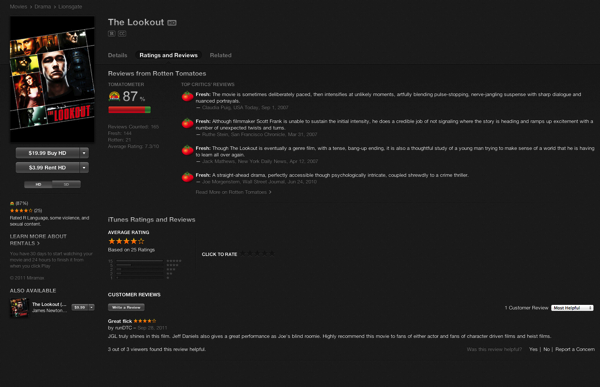
Take a look at this picture.

Screen Shot 2013 05 14 at 3 37 13 PM

For movies, Apple gives us the same customer reviews we get for apps on the App Store. But before those, and much more prominently, we get the Rotten Tomatoes score and blurbs from several professional reviewers.

Do this for apps, and the problem would be solved entirely. No need for us devs to respond to customer reviews that are bogus. The pro reviewers are going to be fair and more prominent.

Meanwhile, the customers can still post their views and be heard. Just not as loudly as professional critics who make a living writing about apps.

So someone needs to create a Rotten Tomatoes for App Store reviews. Pull in reviews from Macworld, Macstories, iMore, the Loop, etc. Average them. Then Apple can show blurbs with links to detailed reviews, just like they do with Rotten Tomatoes for movies.

Everybody wins.

Sometimes We Kick Tires. Sometimes We Buy a Car

Free Trials and Tire Kickers – Marco.org: “But PC-class pricing would fundamentally change iOS buying habits, and we may not like the results.

Browsing the App Store and getting new apps, often spending a few bucks along the way, is a form of casual entertainment for a lot of people. This role used to be filled by movies and music. Today, it’s filled by browsing the internet and playing with mobile apps. Usually, they’re games, but not always — modern mainstream culture, especially younger people, seem to be more interested in media and social apps than games.

This apps-as-entertainment market falls apart if app pricing rises above casual-disposable levels for most people. Few people balk at spending $1-3 for something that doesn’t end up being that great, but when someone’s $30 app is disappointing, that’s going to stick with them and inhibit future purchases.”

(Via marco.org.)

Marco is absolutely right when he says that free trials on iOS wouldn’t solve every developer’s problems, and could actually hurt certain categories of apps.

The thing is though, for anyone making apps that aren’t games or “tire-kicker” experiences, the lack of free trials is absolutely crippling. I don’t want the average selling price on the App Store to be $50 for weather apps. I’m fine with casual apps that are priced according to their purpose. I just want my phone and my iPad to do a lot more than “apps-as-entertainment” allow them to do, too.

We’re not seeing a more sophisticated level of software on iOS not because the iPad is a weak computer. Not because touch interfaces are toys. But because the economics of the App Store make sustaining such an app near impossible. It’s simply not worth the investment.

That’s not just bad for developers. It’s terrible for Apple in the long run, too. And it’s terrible for customers.

Eliminating Usernames and Passwords

PayPal exec aims to “obliterate passwords from the face of the planet” | Ars Technica: “Phones could also authenticate a user with voice biometrics, eye scans, or facial recognition, he said. On PCs, there would be a browser plugin which could recognize the authentication methods that the system is capable of. A USB stick loaded with FIDO software could also work, allowing users to authenticate to computers they don’t own. Google is reportedly working on similar ways to eliminate the password.”

(Via ars technica.)

I’ve made it clear on at least one occasion how much I think user names and passwords are futile. This FIDO concept has me very excited, indeed.